fastai - Lesson 3 - Deep Learning for Coders (2020)
Notes taken from the Deep Learning for Coders (2020) - Lesson 3 video
Notes taken from watching the Lesson 3 - Deep Learning for Coders (2020) video.
00:00:00 - Recap lesson 2
- Last lesson about getting model into production
- Today's lesson:
- Learn foundations of what happens when training a neural network
- Learn about Stochastic Gradient Descent
- Order different from book. This lesson is Chapter 4 and will do Chapter 3 later.
00:01:10 - Resizing images with Datablock
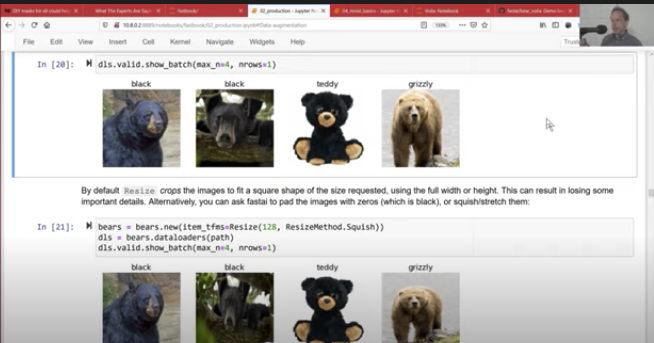
- Images in a batch should be converted to same size.
- Making them squares is most common approach.
- To resize each image to 128x128:
item_tfms=Resize(128)- By default it crops the largest side and resizes.
- To make changes to a Datablock, without affecting the original use
Datablock.new()- Example below changing resize method from
CroptoSquish:
- Example below changing resize method from
from fastai.vision.all import *
path = '../input/fruit-images-for-object-detection/train_zip/train'
def label_func(label):
    """Get label from prefix of filename.

    apple_46.jpg -> apple
    """
    return label.name.split('_')[-2]

fruit = DataBlock(
    blocks=(ImageBlock, CategoryBlock),
    get_items=get_image_files,
    splitter=RandomSplitter(valid_pct=0.2, seed=420),
    get_y=label_func,
    item_tfms=Resize(128)
)
dls = fruit.dataloaders(path)
Default resizing algorithm does a crop.
dls.valid.show_batch(max_n=4, nrows=1)

Can make a copy of a Datablock and change parameters as follows. I'm using it to change resize algorithm to squish
fruit = fruit.new(item_tfms=Resize(128, ResizeMethod.Squish))
dls = fruit.dataloaders(path)
dls.valid.show_batch(max_n=4, nrows=1)

Can also add black bars for padding
fruit = fruit.new(item_tfms=Resize(128, ResizeMethod.Pad, pad_mode='zeros'))
dls = fruit.dataloaders(path)
dls.valid.show_batch(max_n=4, nrows=1)

Can also use reflect for pad mode
fruit = fruit.new(item_tfms=Resize(128, ResizeMethod.Pad, pad_mode='reflection'))
dls = fruit.dataloaders(path)
dls.valid.show_batch(max_n=4, nrows=1)

00:03:28 - Question: why squares and not rectangles
- If you know all images are rectangles - or another aspect ratio - might as well keep the that way.
- If you have tall and some wide, it's easier to square them
- Otherwise, you have to try to get tall and wide ones in each minibatch
00:05:18 - Using RandomResizeCrop
- Can see in the pad example that some images and wide and some are tall.
- All of the methods for resizing have downsizes:
- pad has empty space, so you are wasting computation
- squish is most efficient but changes aspect ratio. That could be bad if that's an important part of classification
- default cropping approach removes some information
- RandomResizeCrop:
- Crop a random part of the image and zoom in.
fruit = fruit.new(item_tfms=RandomResizedCrop(128, min_scale=0.3))
dls = fruit.dataloaders(path)
dls.train.show_batch(max_n=4, nrows=1, unique=True)

- Advantage of that it's a form of [[Data Augmentation]] - each epoch, the model will be trained on a slight variation of the original image
00:08:51 - Data Augmentations and aug_transforms
- Fast.ai provides a list of other data augmentations you can use in the
aug_transformsfunction:
tfms = aug_transforms(mult=2)
tfms
[Flip -- {'size': None, 'mode': 'bilinear', 'pad_mode': 'reflection', 'mode_mask': 'nearest', 'align_corners': True, 'p': 0.5}:
 encodes: (TensorImage,object) -> encodes
 (TensorMask,object) -> encodes
 (TensorBBox,object) -> encodes
 (TensorPoint,object) -> encodes
 decodes: ,
 Brightness -- {'max_lighting': 0.4, 'p': 1.0, 'draw': None, 'batch': False}:
 encodes: (TensorImage,object) -> encodes
 decodes: ]
fruit = fruit.new(item_tfms=Resize(128), batch_tfms=aug_transforms(mult=2))
dls = fruit.dataloaders(path)
dls.train.show_batch(max_n=8, nrows=2, unique=True)

- Note that these are batch tfms:
- they happen to a minibatch at a time on the GPU.
- That means that the augmentation can happen really fast.
00:10:42 - Shift-tab in Juypter
- Press shift-tab in function parenthesis, will pop open a list of arguments.
00:11:10 - Question: how to add different augs for train and valid sets
- Fast.ai automatically avoids add augmentations to valid set. However, it does a centre crop.
00:12:29 - Cleaning data using a trained model
- As per last lesson, I can train the model:
fruit = fruit.new(
    item_tfms=RandomResizedCrop(224, min_scale=0.5),
    batch_tfms=aug_transforms(mult=2))
dls = fruit.dataloaders(path)
learn = cnn_learner(dls, resnet18, metrics=error_rate)
learn.fine_tune(4)
Downloading: "https://download.pytorch.org/models/resnet18-5c106cde.pth" to /root/.cache/torch/hub/checkpoints/resnet18-5c106cde.pth
0%| | 0.00/44.7M [00:00<?, ?B/s]
| epoch | train_loss | valid_loss | error_rate | time |
|---|---|---|---|---|
| 0 | 2.307089 | 2.562253 | 0.812500 | 00:23 |
| epoch | train_loss | valid_loss | error_rate | time |
|---|---|---|---|---|
| 0 | 1.212541 | 1.191454 | 0.562500 | 00:28 |
| 1 | 0.990723 | 0.448721 | 0.187500 | 00:28 |
| 2 | 0.760288 | 0.244519 | 0.104167 | 00:28 |
| 3 | 0.616766 | 0.178925 | 0.083333 | 00:28 |
- We didn't do any data clearning, aside from validating each image can be opened.
- It's much easier to clean your data after you create a model.
- Fast.ai has a tool called
ImageClassifierCleanerthat shows you the images that it's least confident about:
from fastai.vision.widgets import ImageClassifierCleaner
cleaner = ImageClassifierCleaner(learn)
cleaner
VBox(children=(Dropdown(options=('apple', 'banana', 'mixed', 'orange'), value='apple'), Dropdown(options=('Tra…
You can then iterate through all the "delete" ones and unlink them. Then move all the wrongly classified ones to the correct category.
for idx in cleaner.delete():
    cleaner.fns[idx].unlink()
for idx, category in cleaner.change():
    shutil.move(str(cleaner.fns[idx]), path/cat)
00:15:53 - Jupyter notebooks widgets and fastbook reminder
- You can create guis/widgets inside Juypter notebooks.
- Reminder that the whole fastai book was written in Juypter notebooks.
- Best place to learn how something was implemented is to look at notebooks, not modules
00:18:06 - Inference
- Can export to pickle file:
learn.export()
path = Path()
path.ls(file_exts='.pkl')
(#1) [Path('export.pkl')]
learn_inf = load_learner(path/'export.pkl')
Image.open('../input/fruit-images-for-object-detection/test_zip/test/orange_93.jpg')

learn_inf.predict('../input/fruit-images-for-object-detection/test_zip/test/orange_93.jpg')
('orange', tensor(3), tensor([6.3892e-07, 2.1236e-07, 4.1997e-04, 9.9958e-01]))
The 4 things returned are the probabilities of each class. You can find the order by asking for the dataloaders vocab:
learn_inf.dls.vocab
['apple', 'banana', 'mixed', 'orange']
- Any time you have mapping from numbers to string, mapping is stored in vocab.
00:21:24 - Creating application from Juypter notebook
- Curated approach to building web applications from notebooks.
- Key pieces of technology:
- IPython widgets (ipywidgets)
- Voila
import ipywidgets as widgets
btn_upload = widgets.FileUpload()
btn_upload
FileUpload(value={}, description='Upload')
PILImagecan create images from binary blob, which is whatFileUploadreturns
img = PILImage.create(btn_upload.data[-1])
img

- An
Outputwidget is something you can fill in later
out_pl = widgets.Output()
out_pl.clear_output()
out_pl
Output()
I now can run another cell, to update the placeholder:
with out_pl:
    display(img.to_thumb(128, 128))
I can use a Label to display them
lbl_pred = widgets.Label()
lbl_pred.value = 'Please choose an image'
lbl_pred
Label(value='Please choose an image')
Then another button for classification (doesn't do anything yet)
btn_run = widgets.Button(description='Classify')
btn_run
Button(description='Classify', style=ButtonStyle())
... now build an event handler: a function that is called when it's pressed
def on_click_classify(change):
    img = PILImage.create(btn_upload.data[-1])
    out_pl.clear_output()
    with out_pl:
        display(img.to_thumb(128, 128))
    pred, pred_idx, probs = learn_inf.predict(img)
    lbl_pred.value = f'Prediction: {pred}; Prob: {probs[pred_idx]:.04f}'

btn_run.on_click(on_click_classify)
Can now put them all together in a VBox (a vertical button widgets)
btn_upload = widgets.FileUpload()
widgets.VBox([widgets.Label('Select your fruit'),
     btn_upload, btn_run, out_pl, lbl_pred])
VBox(children=(Label(value='Select your fruit'), FileUpload(value={'apple.jpeg': {'metadata': {'name': 'apple.…
00:28:58 - Voila
- Needs to be installed:
!pip install voila > /dev/null 2>&1
!jupyter serverextension enable voila --sys-prefix
Enabling: voila
- Writing config: /opt/conda/etc/jupyter
    - Validating...
      voila 0.2.10 OK
Takes a notebooks and removes the code cells. Converting into an application that can only run the widgets.
- Mybinder can convert a notebook into a free website.
00:33:40 - GPUs or CPUs in production
- In production, since you're usually doing one image at a time, a CPU is likely more efficient for inference.
- Deploying to a CPU is also cheaper and more readily available than GPUs
- When to use a GPU in production?
- Processing videos or audio
- Huge volumes per second, where requests can be batched
- However, if volume is too low users may be waiting
00:36:12 - Deploying to a phone
- Recommendation: deploy to a server, then have phone talk to server
- Trying to get PyTorch to run on phone will require you to convert it to other format using ONNX
- Hard to debug and maintain
00:38:17 - Avoiding disaster
- 2 different types of deployment: hobby apps / prototypes and real-life products
- Things to be careful of:
- Models can only reflect data used to train them
- Healthy skin example from Actionable Auditing: Investigating the Impact of Publicly Naming Biased Performance Results of Commecial AI Products by Deb Raji:
- When you search for "healthy skin" it returns results of young, white woman touching their face.

- When you search for "healthy skin" it returns results of young, white woman touching their face.
- Healthy skin example from Actionable Auditing: Investigating the Impact of Publicly Naming Biased Performance Results of Commecial AI Products by Deb Raji:
- Models can only reflect data used to train them
- Think carefully about types of data you'll see in practice, and make sure it's in the source data.
- If nothing else, make sure test set reflects the data your model will see
- Lots of issues you'll see when deploying models covered in Building Machine Learning Powered Applications by Emmanual Ameisen.
00:42:33 - Out-of-domain data and domain shift
- Consider difference between bear detector in real-life using cameras in a national park vs the prototype:
- Videos not images
- Low-res images
- Bears will be in positions no one would bother uploading to the net
- Would need to be really fast returning results
- Extra: would have to be really careful about Type 2 Errors (False Negatives).
- Out-of-Domain data
- Data that is given to a model that is different to the data it was trained on.
- Domain Shift
- Data that you models see changes over time.
- Example: insurance company using deep learning model for pricing and risk.
- Over time customers they serve change, and so would the risk profile
- Model's trained on older data are no longer relevant.
00:44:58 - All data is bias
- All data is biased: there's no perfectly representative data
- Proposals to address it, like Datasheets for Datasets suggest writing down attributes of the dataset:
- Understand how data was gathered
- How was it collected?
- Who collected it?
- What are its limitations?
- Understand how data was gathered
00:45:55 - High-level approach to mitigate risks in ML products
- Start out doing it manually and have model running alongside person
- Continually compare human predictions to model
- Deploy with a limited scope
- Ensure you have processes to supervise it
- Limit by time and scope
- Gradual expansion
- Have good reporting/monitoring systems in place
- Consider what can go wrong
00:49:51 - Question: does fastai have tools for incrementing improving models?
- You don't need anything special in fastai - just include data from production and retrain.
00:51:00 - Feedback loops and unforeseen consequences
- When you roll out model, it might change the behaviour of system it's a part of
- Could take a minor issue and "explode" into a big issue.
- Predictive policing example:
- Predicts crime in certain areas, causing police to go there
- More police means more arrest, which in turns makes model more confident in predictions
- An example of where Proxy Metrics - you want to reduce crime, but use arrests as a proxy for crime
- Issue is particularly a problem in the prescence of bias
- Risk of having a feedback loop is anytime your model controls what your future data looks like
- Consider human's in the loop: appeals process, monitoring etc
00:57:22 - Writing and blogging
- Think about starting writing before you go much future.
- Keeping on top of what you're learning by writing.
- Fastpages is a platform for blogging with Juypter notebooks
- "Write for yourself 6 months ago"
01:04:09 - MNIST from scratch
- Course now moves into lower-level details of Deep Learning, until next lesson on ethics.
MNIST
Images of handwritten digits
- Collated into ML dataset by Yann Lecun
Example of starting with something really simple and scaling up.
from fastai.vision.all import *
untar_datais an downloads and uncompresses data idempotently.
path = untar_data(URLs.MNIST_SAMPLE)
- fastai adds an
lsmethod toPathwhich returns a fastai class calledL.Lhas all the function features of lists + more.
path.ls?
Signature: path.ls(n_max=None, file_type=None, file_exts=None)
Docstring: Contents of path as a list
File:      /opt/conda/lib/python3.7/site-packages/fastcore/xtras.py
Type:      method
path.ls()
(#3) [Path('/root/.fastai/data/mnist_sample/valid'),Path('/root/.fastai/data/mnist_sample/labels.csv'),Path('/root/.fastai/data/mnist_sample/train')]
(path/'train').ls()
(#2) [Path('/root/.fastai/data/mnist_sample/train/7'),Path('/root/.fastai/data/mnist_sample/train/3')]
threes = (path/'train'/'3').ls().sorted()
sevens = (path/'train'/'7').ls().sorted()
threes
(#6131) [Path('/root/.fastai/data/mnist_sample/train/3/10.png'),Path('/root/.fastai/data/mnist_sample/train/3/10000.png'),Path('/root/.fastai/data/mnist_sample/train/3/10011.png'),Path('/root/.fastai/data/mnist_sample/train/3/10031.png'),Path('/root/.fastai/data/mnist_sample/train/3/10034.png'),Path('/root/.fastai/data/mnist_sample/train/3/10042.png'),Path('/root/.fastai/data/mnist_sample/train/3/10052.png'),Path('/root/.fastai/data/mnist_sample/train/3/1007.png'),Path('/root/.fastai/data/mnist_sample/train/3/10074.png'),Path('/root/.fastai/data/mnist_sample/train/3/10091.png')...]
- Example of one of the images labelled 3:
im3_path = threes[1]
im3 = Image.open(im3_path)
im3

type(im3)
PIL.PngImagePlugin.PngImageFile
01:11:37 PIL and Images
- Python library PIL is one of the most widely used image library.
- In a computer, everything is represented as a number. To view numbers in image in Juypter, we have to convert to NumPy array using the
arrayfunction.
array
<function numpy.array>
- Taking the first 15 rows and the first 10 columns to make visualisation easier.
array(im3)[0:15, 0:10]
array([[  0,   0,   0,   0,   0,   0,   0,   0,   0,   0],
       [  0,   0,   0,   0,   0,   0,   0,   0,   0,   0],
       [  0,   0,   0,   0,   0,   0,   0,   0,   0,   0],
       [  0,   0,   0,   0,   0,   0,   0,   0,   0,   0],
       [  0,   0,   0,   0,   0,   0,   0,   0,   0,   0],
       [  0,   0,   0,   0,   0,   0,   0,   0,   0,  29],
       [  0,   0,   0,   0,   0,   0,   0,  48, 166, 224],
       [  0,   0,   0,   0,   0,  93, 244, 249, 253, 187],
       [  0,   0,   0,   0,   0, 107, 253, 253, 230,  48],
       [  0,   0,   0,   0,   0,   3,  20,  20,  15,   0],
       [  0,   0,   0,   0,   0,   0,   0,   0,   0,   0],
       [  0,   0,   0,   0,   0,   0,   0,   0,   0,   0],
       [  0,   0,   0,   0,   0,   0,   0,   0,   0,  11],
       [  0,   0,   0,   0,   0,   0,   0,   0,   0,  16],
       [  0,   0,   0,   0,   0,   0,   0,   0,   0,   0]], dtype=uint8)
- The numbers are 8-bit unsigned [[Integers]]s, which means the numbers range from 0 to 255.
01:12:26 - Tensors
- Tensors are the PyTorch equivalent of NumPy array, and behaviour very similar.
- Key difference is PyTorch tensor can be computed on GPU.
tensor(im3)[0:15, 0:10]
tensor([[  0,   0,   0,   0,   0,   0,   0,   0,   0,   0],
        [  0,   0,   0,   0,   0,   0,   0,   0,   0,   0],
        [  0,   0,   0,   0,   0,   0,   0,   0,   0,   0],
        [  0,   0,   0,   0,   0,   0,   0,   0,   0,   0],
        [  0,   0,   0,   0,   0,   0,   0,   0,   0,   0],
        [  0,   0,   0,   0,   0,   0,   0,   0,   0,  29],
        [  0,   0,   0,   0,   0,   0,   0,  48, 166, 224],
        [  0,   0,   0,   0,   0,  93, 244, 249, 253, 187],
        [  0,   0,   0,   0,   0, 107, 253, 253, 230,  48],
        [  0,   0,   0,   0,   0,   3,  20,  20,  15,   0],
        [  0,   0,   0,   0,   0,   0,   0,   0,   0,   0],
        [  0,   0,   0,   0,   0,   0,   0,   0,   0,   0],
        [  0,   0,   0,   0,   0,   0,   0,   0,   0,  11],
        [  0,   0,   0,   0,   0,   0,   0,   0,   0,  16],
        [  0,   0,   0,   0,   0,   0,   0,   0,   0,   0]], dtype=torch.uint8)
01:14:49 - Visualising image with Pandas
- Can be added to a Pandas dataframe to turn the background of a cell into a gradient.
im3_t = tensor(im3)
df = pd.DataFrame(im3_t[0:15, 0:20])
df.style.set_properties(**{'font-size': '6pt'}).background_gradient('Greys')
| 0 | 1 | 2 | 3 | 4 | 5 | 6 | 7 | 8 | 9 | 10 | 11 | 12 | 13 | 14 | 15 | 16 | 17 | 18 | 19 | |
|---|---|---|---|---|---|---|---|---|---|---|---|---|---|---|---|---|---|---|---|---|
| 0 | 0 | 0 | 0 | 0 | 0 | 0 | 0 | 0 | 0 | 0 | 0 | 0 | 0 | 0 | 0 | 0 | 0 | 0 | 0 | 0 |
| 1 | 0 | 0 | 0 | 0 | 0 | 0 | 0 | 0 | 0 | 0 | 0 | 0 | 0 | 0 | 0 | 0 | 0 | 0 | 0 | 0 |
| 2 | 0 | 0 | 0 | 0 | 0 | 0 | 0 | 0 | 0 | 0 | 0 | 0 | 0 | 0 | 0 | 0 | 0 | 0 | 0 | 0 |
| 3 | 0 | 0 | 0 | 0 | 0 | 0 | 0 | 0 | 0 | 0 | 0 | 0 | 0 | 0 | 0 | 0 | 0 | 0 | 0 | 0 |
| 4 | 0 | 0 | 0 | 0 | 0 | 0 | 0 | 0 | 0 | 0 | 0 | 0 | 0 | 0 | 0 | 0 | 0 | 0 | 0 | 0 |
| 5 | 0 | 0 | 0 | 0 | 0 | 0 | 0 | 0 | 0 | 29 | 150 | 195 | 254 | 255 | 254 | 176 | 193 | 150 | 96 | 0 |
| 6 | 0 | 0 | 0 | 0 | 0 | 0 | 0 | 48 | 166 | 224 | 253 | 253 | 234 | 196 | 253 | 253 | 253 | 253 | 233 | 0 |
| 7 | 0 | 0 | 0 | 0 | 0 | 93 | 244 | 249 | 253 | 187 | 46 | 10 | 8 | 4 | 10 | 194 | 253 | 253 | 233 | 0 |
| 8 | 0 | 0 | 0 | 0 | 0 | 107 | 253 | 253 | 230 | 48 | 0 | 0 | 0 | 0 | 0 | 192 | 253 | 253 | 156 | 0 |
| 9 | 0 | 0 | 0 | 0 | 0 | 3 | 20 | 20 | 15 | 0 | 0 | 0 | 0 | 0 | 43 | 224 | 253 | 245 | 74 | 0 |
| 10 | 0 | 0 | 0 | 0 | 0 | 0 | 0 | 0 | 0 | 0 | 0 | 0 | 0 | 0 | 249 | 253 | 245 | 126 | 0 | 0 |
| 11 | 0 | 0 | 0 | 0 | 0 | 0 | 0 | 0 | 0 | 0 | 0 | 14 | 101 | 223 | 253 | 248 | 124 | 0 | 0 | 0 |
| 12 | 0 | 0 | 0 | 0 | 0 | 0 | 0 | 0 | 0 | 11 | 166 | 239 | 253 | 253 | 253 | 187 | 30 | 0 | 0 | 0 |
| 13 | 0 | 0 | 0 | 0 | 0 | 0 | 0 | 0 | 0 | 16 | 248 | 250 | 253 | 253 | 253 | 253 | 232 | 213 | 111 | 2 |
| 14 | 0 | 0 | 0 | 0 | 0 | 0 | 0 | 0 | 0 | 0 | 0 | 43 | 98 | 98 | 208 | 253 | 253 | 253 | 253 | 187 |
- We can now clearly see what the computer is doing when it renders an image onto the screen.
- The image is 28x28 for a total of 784 pixels (much smaller than the 28 million (28 megapixels) on my Pixel 4 phone.
01:16:00 - Creating a baseline model without Deep Learning
Pixel similarity
- Single there's only 2 classes, we can define the problem as: how can we classify 3s?
- One approach: get the average of all the pixels of the 3s and find the "ideal" 3.
- Then compute the distance from the "ideal 3"
01:17:33 - Baseline definition
- A simple model that you think will do okay at the task.
- Something quick and easy to implement.
- Any further implementation's performance then has a metric to determine success against.
- "One of the biggest mistakes is that they fail to create a baseline"
01:18:39 - List compreshension
- [[List comprehension]] to get list of all sevens and three images:
sevens
(#6265) [Path('/root/.fastai/data/mnist_sample/train/7/10002.png'),Path('/root/.fastai/data/mnist_sample/train/7/1001.png'),Path('/root/.fastai/data/mnist_sample/train/7/10014.png'),Path('/root/.fastai/data/mnist_sample/train/7/10019.png'),Path('/root/.fastai/data/mnist_sample/train/7/10039.png'),Path('/root/.fastai/data/mnist_sample/train/7/10046.png'),Path('/root/.fastai/data/mnist_sample/train/7/10050.png'),Path('/root/.fastai/data/mnist_sample/train/7/10063.png'),Path('/root/.fastai/data/mnist_sample/train/7/10077.png'),Path('/root/.fastai/data/mnist_sample/train/7/10086.png')...]
- List comprehension is a similar idea to Linq in C#.
seven_tensors = [tensor(Image.open(o)) for o in sevens]
three_tensors = [tensor(Image.open(o)) for o in threes]

len(three_tensors), len(seven_tensors)
(6131, 6265)
- To perform computation across all images, we can stack them all on top of each other as a 3d cube of images to create a "rank-3 tensor"
stacked_sevens = torch.stack(seven_tensors).float()  / 255
stacked_threes = torch.stack(three_tensors).float() / 255
- Taking the mean in PyTorch, requires casting [[Integer]] types to [[Float]] types, which we'll do below.
- Note that when converting images to floats, the convention is for the pixel intensity value to be between 0 and 1.
show_image(three_tensors[1])
<AxesSubplot:>

01:22:44 - Axis of tensors
- A rank-3 tensor means it has 3 axis or dimensions.
- Numpy calls rank value axis.
- PyTorch calls it dimension.
- The shape attribute of a tensor returns a list with each element representing the size of an axis:
stacked_threes.shape
torch.Size([6131, 28, 28])
- Can get the rank of the tensor by taking the shape or calling
ndim:
len(stacked_threes.shape), stacked_threes.ndim
(3, 3)
- The term "dimension" is used in 2 ways.
- Sometimes used for size of an axis (space is 3 dimensional - each datapoint has an (x, y, z) value)
- Sometimes used for the rank, or number of axes (a matrix has 2 dimensions)
- When confusing, use rank, axis and length which are unambiguous.
01:23:57 - Computing the mean
- Can calculate the mean of all image tensors, by taking mean along dimension zero, which gives us the "ideal" 3.
mean3 = stacked_threes.mean(0)
show_image(mean3);

- Note: that if we didn't provide an axis, it would be the average across all axis:
stacked_threes.mean()
tensor(0.1415)
* Same for 7s:
mean7 = stacked_sevens.mean(0)
show_image(mean7)
<AxesSubplot:>

01:24:52 - Computing distance from mean
- First, i'll take one example of 3 at random:
a_3 = stacked_threes[10]
- Can't simply subtract each pixel from the corresponding pixel in the mean image, because some values would be negative and would average to nothing.
- Two approaches we could take to make positive values:
- Take the mean of absolute value of differences ([[Absolute Value]] is a function that replaces negative values with positive values).
- Called [[Mean Absolute Difference (L1 Norm)]]
- Take the mean of the square of differences (which also makes everything positive) then take square root (to undo the squaring).
- Called [[Root mean squared error (RMSE) (L2 norm]]
- Penalises bigger mistakes than L1 Norm.
- Called [[Root mean squared error (RMSE) (L2 norm]]
- Take the mean of absolute value of differences ([[Absolute Value]] is a function that replaces negative values with positive values).
- Mean absolute difference:
dist_3_abs = (a_3 - mean3).abs().mean()
dist_3_sqr = ((a_3 - mean3)**2).mean().sqrt()
dist_3_abs, dist_3_sqr
(tensor(0.1100), tensor(0.2018))
- Root mean squared error (RMSE)
dist_7_abs = (a_3 - mean7).abs().mean()
dist_7_sqr = ((a_3 - mean7)**2).mean().sqrt()
dist_7_abs, dist_7_sqr
(tensor(0.1556), tensor(0.2989))
- Since it's clearly closer to the 3 than the 7, we can guess it's 3.
- PyTorch provides these as loss functions in
torch.nn.functionalwhich is usually imported asF:
F.l1_loss(a_3.float(), mean7), F.mse_loss(a_3, mean7).sqrt()
(tensor(0.1556), tensor(0.2989))
- MSE stands for mean squared error and L1 refers to math jargon for mean absolute value (in math called L1 Norm)
01:28:38 - Working with arrays and tensors
- Important to be comfortable working with arrays and tensors. Summary of key things:
- Create array or tensor with lists of lists:
data = [[1, 2, 3], [4, 5, 6]]
arr = array(data)
tns = tensor(data)
arr # numpy
array([[1, 2, 3],
       [4, 5, 6]])
tns
tensor([[1, 2, 3],
        [4, 5, 6]])
- Can index into a single row:
tns[1,:]
tensor([4, 5, 6])
- Or single column...in this example, we're fetching all columns:
tns[:,1]
tensor([2, 5])
- Can combine with Python slice syntax (
[start:end],endbeing excluded)
tns[1, 1:3]
tensor([5, 6])
- Can add to tensor
tns + 1
tensor([[2, 3, 4],
        [5, 6, 7]])
They have a type:
tns.type()
'torch.LongTensor'
Automaticaly converted from int to float if needed:
tns * 1.5
tensor([[1.5000, 3.0000, 4.5000],
        [6.0000, 7.5000, 9.0000]])
01:30:53 - Computing metrics using broadcasting
- We want to create a validation set to check how good the model is.
valid_3_tens = torch.stack([tensor(Image.open(o))
                            for o in (path/'valid'/'3').ls()])
valid_3_tens = valid_3_tens.float()/255
valid_7_tens = torch.stack([tensor(Image.open(o))
                            for o in (path/'valid'/'7').ls()])
valid_7_tens = valid_3_tens.float()/255
valid_3_tens.shape, valid_7_tens.shape
(torch.Size([1010, 28, 28]), torch.Size([1010, 28, 28]))
- Want to write a function
is_3that return True if it's a 3. - We can first create a function that returns the mean of difference between somethings
def mnist_distance(a, b):
    return (a - b).abs().mean((-1, -2))

mnist_distance(a_3, mean3)
tensor(0.1100)
- To do for the entire validation set, we can call the same function on the entire validation set:
valid_3_dist = mnist_distance(valid_3_tens, mean3)
valid_3_dist, valid_3_dist.shape
(tensor([0.1270, 0.1632, 0.1676,  ..., 0.1228, 0.1210, 0.1287]),
 torch.Size([1010]))
Being able to run the same function on a single image or a rank-3 tensor of images is thanks to [[Broadcasting]].
- Broadcasting expands the tensor with the smaller rank to have same size as one with larger rank.
- In PyTorch, the broadcasting operation is done on the GPU.
Need to first understand [[Element-wise operations]]
- Operations that are performed on the corresponding elements of 2 vectors:
tensor([1,2,3]) + tensor([1,0,3])
tensor([2, 2, 6])
tensor([[1,2,3],[1,2,3]]) + tensor([1,0,3], [1,1,1])
tensor([[2, 2, 6],
        [2, 3, 4]])
- When you have different shapes, PyTorch "copies" the matrix the number of times required to have a shape that matches the larger rank.
- It doesn't actually allocate any additional memory for copies of the matrix, just acts like it does.
- Does all the operations in C or Cuda
(valid_3_tens - mean3).shape
torch.Size([1010, 28, 28])
- We can then call abs value, which calls it on each value:
(valid_3_tens - mean3).abs().shape
torch.Size([1010, 28, 28])
- Can then create an
is_3function, which compares distance between perfect 3 and 7:
def is_3(x): return mnist_distance(x, mean3) < mnist_distance(x, mean7)
- When you convert boolean response to float, get 1.0 for true and 0.0 for false:
is_3(a_3), is_3(a_3).float()
(tensor(True), tensor(1.))
- Can test on full validation set of threes
is_3(valid_3_tens)
tensor([ True, False, False, ..., True, True, False])
- Not that you're avoiding loops. Which makes it thousands or more times faster.
accuracy_3s = is_3(valid_3_tens).float().mean()
accuracy_7s = (1 - is_3(valid_7_tens).float()).mean()
accuracy_3s, accuracy_7s, (accuracy_3s + accuracy_7s) / 2
(tensor(0.9168), tensor(1.), tensor(0.9584))
- Model is over 95% accurate to recognise 3s from 7s.
01:39:50 - Stochastic Gradient Descent (SGD)
So far solution doesn't fit Arthur Samuel's description of Machine Learning.
- It doesn't include a way to test and update the weight assignment.
Instead of finding an ideal image, we could instead develop a set of weights for each pixel and train it to be better at recognising images.
Want a function that takes the pixels of an image and the weights and returns a probability of it being a certain number. For simplicity we'll turn the weights and image into a long vector:
- 28x28 -> 1x784
def pr_eight(x, w):
    return (x * w).sum()
- The approach to try is as follows:
- Set the weights of the vector w to random values.
- For each image, use weights to predict whether it appears to be a 3 or a 7.
- Based on weights, calculate loss to see how good model is.
- Calculate the gradient: for each weight, if I made smaller or larger, how would changing the weight change the loss?
- Step (change) the weights based on the calculation.
- Repeat from 2.
- Stop training if results are good enough, or you don't want to wait any longer.
This approach is called Gradient Descent.
Each 7 steps has lots of choices that can be made. But the general approach follows basic principles:
- Initialise: set params to random values.
- Loss: Arthur Samuel's "testing the effectiveness of any current weight assignment in terms of actual performance"
- Need a function that return a number that is small if performance of model is good.
- Step: could figure out if loss should be increased or decreased by just trying different values and seeing what happens. However, it's slow. Calculus allows us to figure out what direction to change the weights in.
- Stop: decide when to stop. Usually just a certain number of epochs.
01:46:05 - A simple first approach
- Start with a simple quadratic function - pretending it's a loss function with
xas weight param of function:
def f(x):
    return x**2
def plot_function(f, tx=None, ty=None, title=None, min=-2, max=2, figsize=(6,4)):
    x = torch.linspace(min,max)
    fig,ax = plt.subplots(figsize=figsize)
    ax.plot(x,f(x))
    if tx is not None: ax.set_xlabel(tx)
    if ty is not None: ax.set_ylabel(ty)
    if title is not None: ax.set_title(title)
plot_function(f, 'x', 'x**2')
/opt/conda/lib/python3.7/site-packages/ipykernel_launcher.py:2: UserWarning: Not providing a value for linspace's steps is deprecated and will throw a runtime error in a future release. This warning will appear only once per process. (Triggered internally at /opt/conda/conda-bld/pytorch_1603729141890/work/aten/src/ATen/native/RangeFactories.cpp:23.)

Try to find the bottom point - the x value at the bottom.
Start by picking a random value of parameter and calculating value of loss
plot_function(f, 'x', 'x**2')
plt.scatter(-1.5, f(-1.5), color='red')
<matplotlib.collections.PathCollection at 0x7f305cfa73d0>

Then, see what happens if we increase or decrease our params a bit. This is slope at a particular point:

If you change weight in the direction of slope, and calculate loss and adjustment again, repeat this a few times.
Eventually, you will get to lowest point on curve:

- Idea comes from Newton and is called: "Newton's Method"
01:48:05 - Calculating the gradients
- To calculate the derivative, we need calculus.
- However, you don't have to do calculus: the computer does it for you.
- In PyTorch, a tensor can be modified with
requires_grad_(), so that every calculation has the gradient calculated.
xt = tensor(3.).requires_grad_()
- In PyTorch, when the method ends with
_it means the function modifies the Tensor in place - it doesn't just return a new one.
yt = f(xt)
yt
tensor(9., grad_fn=<PowBackward0>)
- Can then tell PyTorch to calculate the gradients, using the
backward()function.- Backward refers to "Back propagation" which means to take the gradient.
yt.backward()
- We can view the gradients by checking the
gradattribute of the tensor:
xt.grad
tensor(6.)
We know that worked from the power rule:
dx(x**2) = 2x(dx(3**3=2) = 6)Now we can repeat with a vector argument:
xt = tensor([3., 4., 10.]).requires_grad_()
xt
tensor([ 3., 4., 10.], requires_grad=True)
- Add
sum()to function to take a vector (rank-1 tensor) and return a scalar (rank-0 tensor):
def f(x): return (x**2).sum()

yt = f(xt)
yt
tensor(125., grad_fn=<SumBackward0>)
- We expect the gradients to be 6, 8 and 20 respectively. Let's see:
yt.backward()
xt.grad
tensor([ 6., 8., 20.])
01:52:41 - Learning rates
- The gradient only tells us the slope of the function. Doesn't say how far to adjust the params.
- If the slope is large, then there are more adjustments to do, but if small then we may be close.
- Can use a simple function that subtracts the gradients multiplied by some smaller number (usually between 0.001 and 0.1) called: learning rate.
w ~= gradient(w) * lr
- If the learning rate is too small, it will take a long time to "converge" (find the min)
- If too large, it may never find it.
- Picking a good learning rate is an essential part of gradient descent.
01:54:41 - Gradient Descent end-to-end example
- Imagine measuring speed of rollercoaster as it goes over and down a hump.
time = torch.arange(0, 20).float(); time
tensor([ 0.,  1.,  2.,  3.,  4.,  5.,  6.,  7.,  8.,  9., 10., 11., 12., 13.,
        14., 15., 16., 17., 18., 19.])
speed = torch.randn(20) * 3 + 0.75 * (time - 9.5)** 2 + 1
plt.scatter(time, speed)
<matplotlib.collections.PathCollection at 0x7f305cf49150>

- A bit of random noise was added, which estimates at anytime what the speed of the roller coaster is. We can start by guessing it's a quadradtic function:
def f(t, params):
    a, b, c = params
    return a * (t ** 2) + (b * t) + c
def mse(preds, targets):
    return ((preds - targets) ** 2).mean()
Step 1. Init to random values and tell PyTorch to check gradients with requires_grad_()
params = torch.randn(3).requires_grad_()
orig_params = params.clone()
Step 2. Calculate the predictions:
preds = f(time, params)
- Create a function that shows how close predictions are to target. The predictions are shown in red.
def show_preds(preds, ax=None):
    if ax is None:
        ax = plt.subplots()[1]
    ax.scatter(time, speed)
    ax.scatter(time, to_np(preds), color='red')
    ax.set_ylim(-300, 100)
show_preds(preds)

- Obviously we arne't very close since we haven't done any training.
Step 3. Calculate the loss:
loss = mse(preds, speed)
loss
tensor(9926.4844, grad_fn=<MeanBackward0>)
The goal is to improve it. To do it, we'll need to know the gradients.
Step 4. Calculate the gradients. An approximation of how params need to change.
loss.backward()
params.grad
tensor([32286.3848, 2084.4243, 125.6352])
params.grad * 1e-5
tensor([0.3229, 0.0208, 0.0013])
Step 5. Update the params based on gradients ("step" the weights)
- We use
.dataattribute which ensures the gradient isn't calculated on that step.
lr = 1e-5
params.data -= lr * params.grad.data
params.grad = None
Has loss improved?
preds = f(time, params)
loss = mse(preds, speed)
loss
tensor(2415.8665, grad_fn=<MeanBackward0>)
show_preds(preds)

Looks like it has! Quite a bit.
Let's do it a bunch more times.
def apply_step(params, prn=True):
    preds = f(time, params)
    loss = mse(preds, speed)
    loss.backward()
    params.data -= lr * params.grad.data
    params.grad = None
    if prn: print(loss.item())
    return preds
for i in range(10): apply_step(params)
2415.866455078125
994.6248168945312
725.6793212890625
674.7831420898438
665.148681640625
663.3221435546875
662.97314453125
662.9036865234375
662.8871459960938
662.8807373046875
- We can also visualise the loss getting better:
params = orig_params.detach().requires_grad_()
_,axs = plt.subplots(1, 4, figsize=(12, 3))
for ax in axs: show_preds(apply_step(params, False), ax)
plt.tight_layout()

- Step 7 is to just stop. We usually stop when we stop seeing performance improvements on validation set.