Week 2 - Regression: Predicting House Prices
- Regression:
- Have a set of features and observations and figure out how the observations change as the features change.
- Example of features: house features:"size of house", "how many bathrooms", "suburb".
- Example of observations: house observations: "price of house", "how quickly it sells".
- Predicting house prices
- How do you estimate the value of a house?
- Look at how much other houses sold for.
- Look at sizes of other houses
- Look at other features
- How do you estimate the value of a house?
-
Terminology:
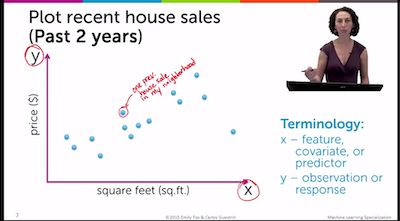
- x-axis
- Feature
- Covariant
- Predictor
- Independant Variable
- y-axis
- Observation
- Response
- Dependant variable
- Naive approach:
- Take other prices near your set of features and use those.
- Problem: limited because it doesn't take into account the other data available.
- Model-based approach
- "Understand relationship between square footage and house price"
- Put a line through the data.
- Line definition:
f(x) = W0 + W1 * x(reversed from usual slope intercept definitions)W1== slope (weight on feature or coefficient of independant variable)W0== intercept- Extra resources:
- How do you find the best line? Use Residual sum of squares (RSS) algorithm and find the lowest for set of possible
W1andW0values. - RSS algorithm in Python:
  def RSS(W0, W1):
      output = 0
      for house_price, house_squared_footage in house_data:
          output += (house_price - W0 + W1 * house_squared_footage) ** 2

      return output
- x-axis
-
Adding higher order effects
- Firstly, "higher-order" in this context refers to using exponents in equations
- Second order equation:
x**2 + 3x + 1(aka quadratic). - Data might not have a linear relationship, could be quadratic.
- Even with quadratic best fit lines, still considered "linear regression" because the squaring in the model is just considered another feature.
- Could even be a 13th order polynomial, which might be best fit for data but returns results we now intuitively are not correct.
- Overfitting via training / test split.
- Overfitting: your model is perfect fit for your data but not a good general algorithm for making predictions.
- Potential solutions:
- "Simulate predictions":
- Take some data out of your dataset
- Fit model on remaining data.
- See what predictions model would make for data you took out.
- "Simulate predictions":
- Training set: data you're using to create model.
- Test set: data you're pulling out of set above.
- Training error:
- Same as RSS calculation but with test set removed.
- Test error:
- Same as RSS calculation but just test set.
- Then: "how does training error and test error vary as a function of the model complexity"
- Evaluating regression models
- As model order increases, the training error will decrease.
- The test error, on the other hand, will eventually increase as model order increases.
- Adding other features
- Look at relationships between other features and observation.
- With an extra feature, we'd fit a Hyperplane through features, instead of line in 2d space.
Exercise Notes
-
To randomly split the data for training and test data, use
random_splitmethod:train_data,test_data = sales.random_split(.8, seed=98765) -
Graphlab has a method for creating a linear regression model called:
linear_regression.create(data, target, features)sqft_model = graphlab.linear_regression.create(train_data, target='price', features=['sqft_living']) -
Can evaluate a model with the test data using
evaluate(data_set)method:sqft_model.evaluate(test_data) {'max_error': 4395151.7166637955, 'rmse': 269951.8883121436} -
max_error- max badly predicted house. rmse- root mean squared error (square root of RSS).-
Importing stuff from
matplotlibexample:import matplotlib.pyplot as plt -
To show predicts on top of actual test data:
plt.plot(test_data['sqft_living'],test_data['price'],'.',test_data['sqft_living'],sqft_model.predict(test_data),'-') -
To get
coefficientsfrom model:sqft_model.get('coefficients') -
To create a box whisker plot:
sales.show(view='BoxWhisker Plot', x='zipcode', y='price') -
Logical filters:
sales[(sales['price'] > 100) & (sales['price'] < 200)]